

If you've ever faced the dreaded "Null Pointer Exception" while building a Flutter app, you're not alone. With the introduction of Dart's null safety, developers can now prevent many of these common crashes — but only if they understand how null safety works and how to use it effectively.
In this blog, we'll explore what a Null Pointer Exception is, why it happens, and how to fix null safety issues in Flutter like a pro.
💥 What is a Null Pointer Exception?
A Null Pointer Exception (NPE) occurs when your Flutter app tries to access a property, method, or variable that hasn't been initialized yet — in simple terms, it's null.
For example:
String? name;
print(name.length); // ❌ This will throw an error
In the above case, name is null, but we're trying to access its length. This leads to a runtime crash, commonly known as a Null Pointer Exception.
⚙️ Why Null Safety Was Introduced in Dart
Before Dart 2.12, variables could hold null values even if you didn't expect them to. This led to unpredictable app crashes and bugs.
To make the language more robust, Dart introduced sound null safety, ensuring that variables are non-nullable by default — unless you explicitly allow them to be nullable.
🧠 Common Null Safety Issues in Flutter
Even with null safety enabled, developers often face these common issues:
- ❗ Accessing properties on a null variable
User? user;
print(user!.name); // ❌ Throws error if user is null
2. 🌀 Uninitialized nullable variables Declaring a variable but forgetting to initialize it before use.
3. 🔁 Incorrect use of null-aware operators
Using ! without verifying that the variable is indeed non-null, it can still lead to runtime exceptions.
🧩 How to Fix Null Pointer Exceptions in Flutter
✅ 1. Correctly Initialize Nullable Variables
Always ensure your variables have an initial value before accessing them.
String name = "Flutter";
print(name.length); // ✅ Safe
✅ 2. Use Null-Aware Operators
Dart provides helpful null-aware operators to prevent exceptions:
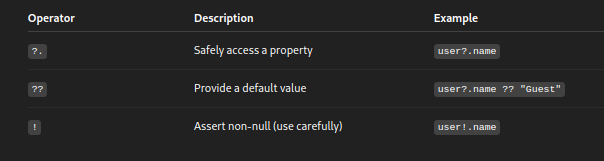
Example:
print(user?.name ?? "Guest User");✅ 3. Add Explicit Null Checks
Manually check for null before using a variable:
if (user != null) {
  print(user.name);
}
💡 Best Practices to Avoid Null Safety Issues
- 🔹 Prefer non-nullable types whenever possible.
- 🔹 Initialize variables during declaration.
- 🔹 Avoid unnecessary use of the
!operator. - 🔹 Use the Dart analyzer and IDE warnings — they're your first line of defense.
- 🔹 Write unit tests to validate your data flow.
🚀 Conclusion
Null safety in Flutter is a powerful feature that helps developers write more reliable and crash-free apps. By understanding how null-aware operators work and ensuring your variables are properly initialized, you can eliminate Null Pointer Exceptions once and for all.
So next time your app crashes due to a null value — remember, Dart already gave you the tools to prevent it. Use them wisely! 💪