

Flutter packages are a fundamental part of Flutter development, allowing developers to extend their applications with additional functionality without reinventing the wheel. This guide covers all the methods for adding packages to your Flutter projects.
1. Using pub.dev and pubspec.yaml (Most Common Method)
Manual Addition
The most straightforward way to add packages is by manually editing your pubspec.yaml file:
- Open your project's
pubspec.yamlfile - Under
dependencies:, add the package with its version:
dependencies:
  flutter:
    sdk: flutter

package_name: ^version_number- Run
flutter pub getin your terminal - Import the package in your Dart files:
import 'package:package_name/package_name.dart';Using Flutter CLI
You can add packages directly through the command line:
flutter pub add package_nameThis command automatically:
- Adds the package to your
pubspec.yaml
Runs flutter pub get- Updates your
pubspec.lockfile
2. Git Dependencies
For packages hosted on Git repositories, you can specify the source directly in your pubspec.yaml:
dependencies:
  package_name:
    git:
      url: https://github.com/username/repository.git
      ref: branch_name  # Optional: specify branch, tag, or commit
In your pubspec.yaml, you can reference a Git repository using SSH like this:
dependencies:
  my_private_package:
    git:
      url: git@github.com:username/repo.git
      ref: main  # or specific branch/tag/commit
For BitBucket:
dependencies:
  my_private_package:
    git:
      url: git@bitbucket.org:username/repo.git
For Azure DevOps:
dependencies:
  my_private_package:
    git:
      url: git@ssh.dev.azure.com:v3/organization/project/repository
Git Dependency Variations:
- Specific commit:
dependencies:
  package_name:
    git:
      url: https://github.com/username/repository.git
ref: commit_hash- Specific tag:
dependencies:
  package_name:
    git:
      url: https://github.com/username/repository.git
      ref: v1.0.0
3. Path Dependencies (Local Packages)
For local package development or when working with packages not yet published:
dependencies:
  package_name:
    path: ../local_package_path
4. Hosted Packages (Custom Package Repository)
For organizations using private package repositories:
dependencies:
  package_name:
    hosted:
      name: package_name
      url: https://your-package-repository.com
    version: ^1.0.0
5. SDK Dependencies
For packages that are part of the Flutter or Dart SDK:
dependencies:
  flutter:
    sdk: flutter
  flutter_localizations:
    sdk: flutter
6. Development Dependencies (dev_dependencies)
Development dependencies are packages used only during development and testing, not in the production application. They follow similar patterns to regular dependencies but are specified under dev_dependencies your pubspec.yaml.
Basic dev_dependencies
dev_dependencies:
  flutter_test:
    sdk: flutter
  build_runner: ^2.4.6
  json_serializable: ^6.7.1
Using Flutter CLI
flutter pub add dev:package_nameFor example:
flutter pub add dev:build_runner
flutter pub add dev:mockito
Git-based Dev Dependencies
dev_dependencies:
  dev_package:
    git:
      url: git@github.com:username/repo.git
      ref: main  # optional: branch, tag, or commit
Local Path Dev Dependencies
dev_dependencies:
  dev_package:
    path: ../local_dev_package
Hosted Private Dev Dependencies
dev_dependencies:
  dev_package:
    hosted:
      name: dev_package
      url: https://your-private-repo.com
    version: ^1.0.0
Common Use Cases and Examples
a. Testing Packages
dev_dependencies:
  flutter_test:
    sdk: flutter
  mockito: ^5.4.2
  test: ^1.24.9
  integration_test:
    sdk: flutter
b. Code Generation Tools
dev_dependencies:
  build_runner: ^2.4.6
  json_serializable: ^6.7.1
  freezed: ^2.4.5
  auto_route_generator: ^7.3.1
c. Static Analysis and Linting
dev_dependencies:
  flutter_lints: ^2.0.3
  custom_lint: ^0.5.7
  dart_code_metrics: ^5.7.6
Best Practices and Tips
Version Constraints
- Caret syntax (^):
^1.2.3allows all versions from 1.2.3 to 2.0.0
dependencies:
  flutter:
    sdk: flutter

package_name: ^1.2.3 # 1.2.3 to 2.0.0- Exact version:
1.2.3allows only version 1.2.3
dependencies:
  flutter:
    sdk: flutter

package_name: 1.2.3 # Only 1.2.3- Range:
'>=1.2.3 <2.0.0'allows versions within the specified range
dependencies:
  flutter:
    sdk: flutter

  package_name: '>=1.2.3 <2.0.0' # '>=1.2.3 <2.0.0' all versions within the specified range
Dependency Resolution
- Run
flutter pub outdatedto check for package updates - Use
flutter pub upgradeto upgrade all packages - Use
flutter pub upgrade --major-versionsfor major version upgrades
Security Considerations
- Always verify package sources
- Check package documentation for compatibility
- Review package licenses
- Test thoroughly after adding new packages
Performance Optimization
- Remove unused packages
- Keep packages updated
- Consider package size and impact on app size
- Use
dev_dependenciesfor packages only needed during development
Common Issues and Solutions
Version Conflicts
If you encounter version conflicts:
- Check your
pubspec.lockfile - Use
flutter pub depsto view the dependency tree
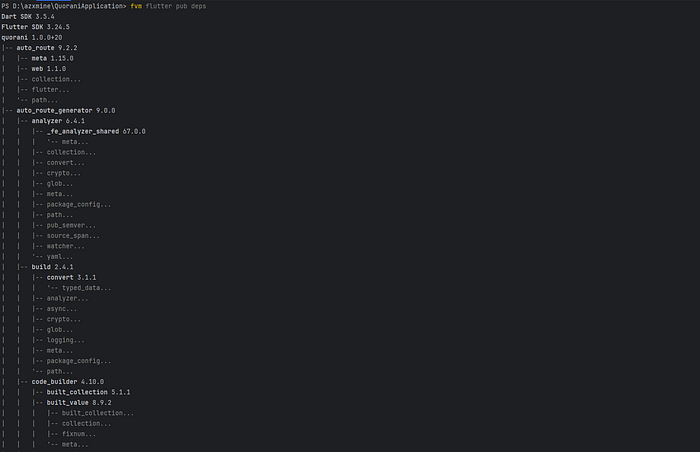
- Adjust version constraints
- Consider using
dependency_overridesas a last resort
Package Not Found
If packages aren't found:
- Verify package name spelling
- Check internet connection
- Ensure
pub.devis accessible - Verify package exists for your Flutter version
Conclusion
Understanding these different methods of adding packages to your Flutter project is crucial for efficient development. Choose the appropriate method based on your specific needs:
- Use
pub.devfor public packages - Use Git dependencies for unreleased features
- Use path dependencies for local development
- Use hosted dependencies for private packages
Happy Coding 🚀