

Flutter can be pretty unforgiving when it comes to layout issues. Let me walk you through the most annoying ones and how to actually fix them.
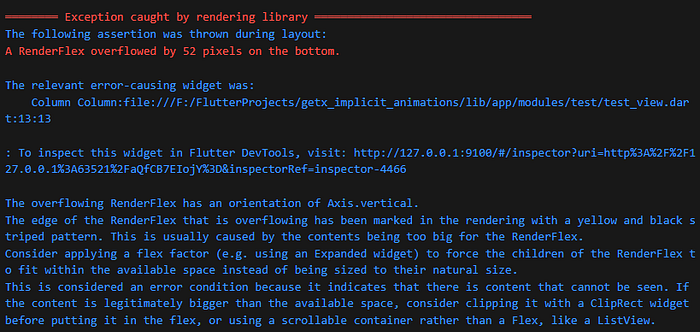
RenderFlex overflow errors
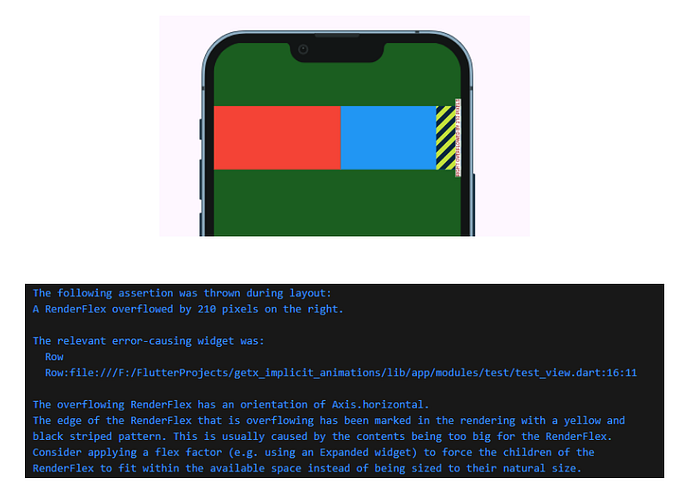
This one drives everyone crazy when they start with Flutter. You put too much stuff in a Row or Column, and boom — yellow and black stripes everywhere.
If you are a member, please continue, otherwise, read the full story here.
Here's what usually causes the problem:
          Row(
            children: [
              Container(width: 200, height: 100, color: Colors.red),
              Container(width: 200, height: 100, color: Colors.blue),
              Container(width: 200, height: 100, color: Colors.green),
            ],
          ),
The fix is usually wrapping things in Flexible or Expanded:
      Row(
        children: [
          Flexible(child: Container(width: 200, height: 100, color: Colors.red)),
          Flexible(child: Container(width: 200, height: 100, color: Colors.blue)),
          Flexible(child: Container(width: 200, height: 100, color: Colors.green)),
        ],
      ),
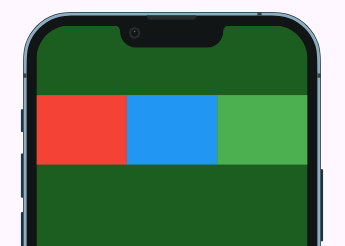
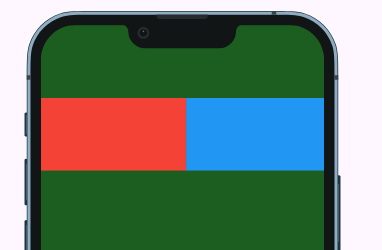
Sometimes you just need to wrap the whole Row in a SingleChildScrollView if you actually want horizontal scrolling.
         SingleChildScrollView(
            scrollDirection: Axis.horizontal,
            child: Row(
              children: [
                Container(width: 200, height: 100, color: Colors.red),
                Container(width: 200, height: 100, color: Colors.blue),
                Container(width: 200, height: 100, color: Colors.green),
              ],
            ),
          ),
Bottom overflow with keyboard
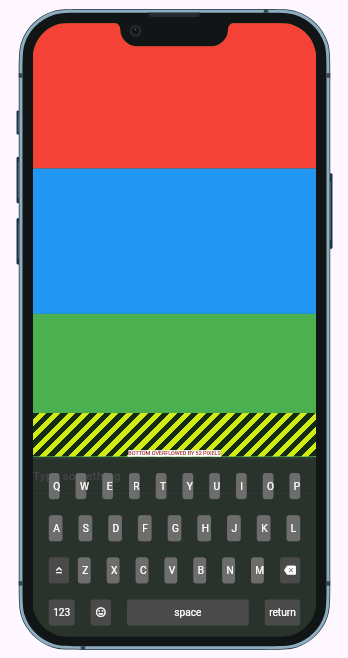
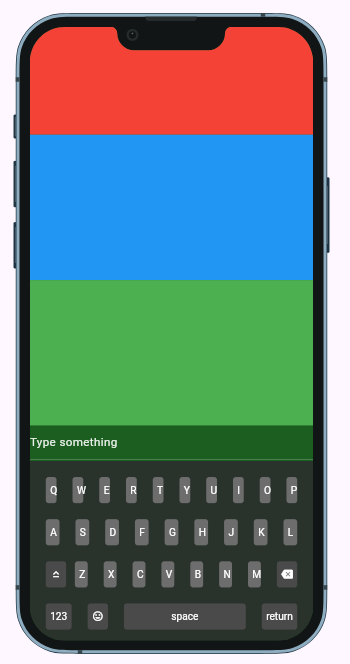
This happens when your keyboard pops up and you have too much content on the screen.
Problem code:
return Scaffold(
      body: Column(
        children: [
          Container(height: 200, color: Colors.red),
          Container(height: 200, color: Colors.blue),
          Container(height: 200, color: Colors.green),
          TextField(decoration: InputDecoration(hintText: 'Type something')),
        ],
      ),
    );
The fix depends on what you want. Usually it's SingleChildScrollView:
class BottomOverflowFixedExample extends GetView {
  @override
  Widget build(BuildContext context) {
    return Scaffold(
      body: SingleChildScrollView(
        child: Column(
          children: [
            Container(height: 300, color: Colors.red),
            Container(height: 400, color: Colors.blue),
            Container(height: 300, color: Colors.green),
            TextField(decoration: InputDecoration(hintText: 'Type something')),
          ],
        ),
      ),
    );
  }
}
Unbounded height in ListView
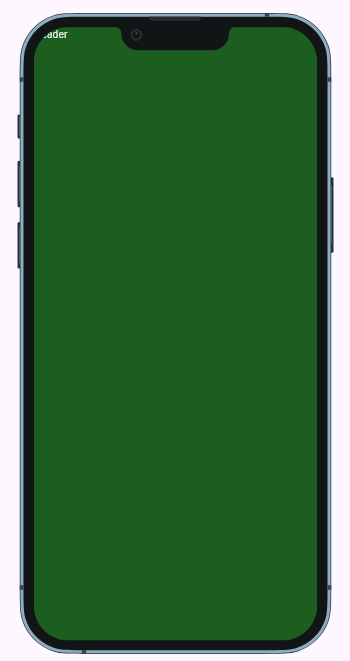
This one's confusing because the ListView inside the Column doesn't work by default. You get some cryptic error about unbounded constraints.
Problem:
  return Scaffold(
      body: Column(
        children: [
          Text('Header'),
          ListView(
            children: [
              ListTile(title: Text('Item 1')),
              ListTile(title: Text('Item 2')),
              ListTile(title: Text('Item 3')),
            ],
          ),
        ],
      ),
    );
Suddenly, there is nothing on the screen:
And an exception in the debug console:
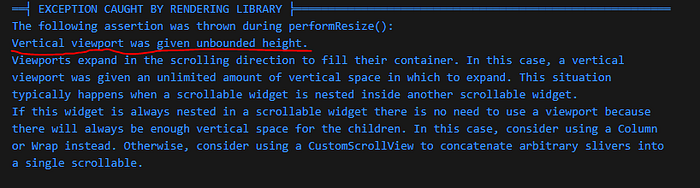
We will get similar exception by putting any scrollable widget inside another scrollable one.
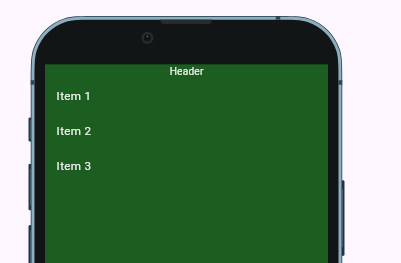
Fix: We need to either wrap the ListView in Expanded :
SafeArea(
      child: Scaffold(
        body: Column(
          children: [
            Text('Header'),
            Expanded(
              child: ListView(
                children: [
                  ListTile(title: Text('Item 1')),
                  ListTile(title: Text('Item 2')),
                  ListTile(title: Text('Item 3')),
                ],
              ),
            ),
          ],
        ),
      ),
    );
or give it a fixed height:
return  SafeArea(
      child: Scaffold(
        body: Column(
          children: [
            Text('Header'),
            SizedBox(
              height: 200,   //here
              child: ListView(
                children: [
                  ListTile(title: Text('Item 1')),
                  ListTile(title: Text('Item 2')),
                  ListTile(title: Text('Item 3')),
                ],
              ),
            ),
          ],
        ),
      ),
    );
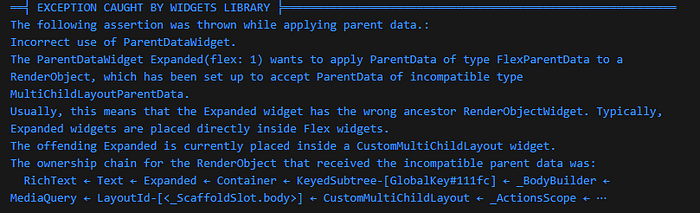
Incorrect use of ParentDataWidget
This error shows up when you use Expanded in the wrong place. It's like putting a square peg in a round hole.
Wrong usage:
class ParentDataWrongExample extends GetView {
  @override
  Widget build(BuildContext context) {
    return Scaffold(
      body: Container(
        child: Expanded(  // This doesn't make sense here
          child: Text('Exception will be thrown'),
        ),
      ),
    );
  }
}
Expanded only works inside Flex widgets like Row, Column, or Flex:
return  SafeArea(
      child: Scaffold(
        body: Container(
        child: Column(
          children: [
            Expanded(  // This doesn't make sense here
              child: Text('Exception will be thrown'),
            ),
          ],
        ),
      ),
      ),
    );
We can get similar exception by putting the Positioned outsite of Stack:
return  SafeArea(
      child: Scaffold(
        body: Container(
        child: Column(
          children: [
            Positioned(  // This doesn't make sense here
              child: Text('Exception will be thrown'),
            ),
          ],
        ),
      ),
      ),
    );
That's all I remember for now. If you know more, tell me in the comments I will put it here for future reference. 🙏
👉More stories about Flutter layout
Happy designing!